DSL Interface
This section describes the interfaces designed to provide DSL capabilities.
Overall Structure
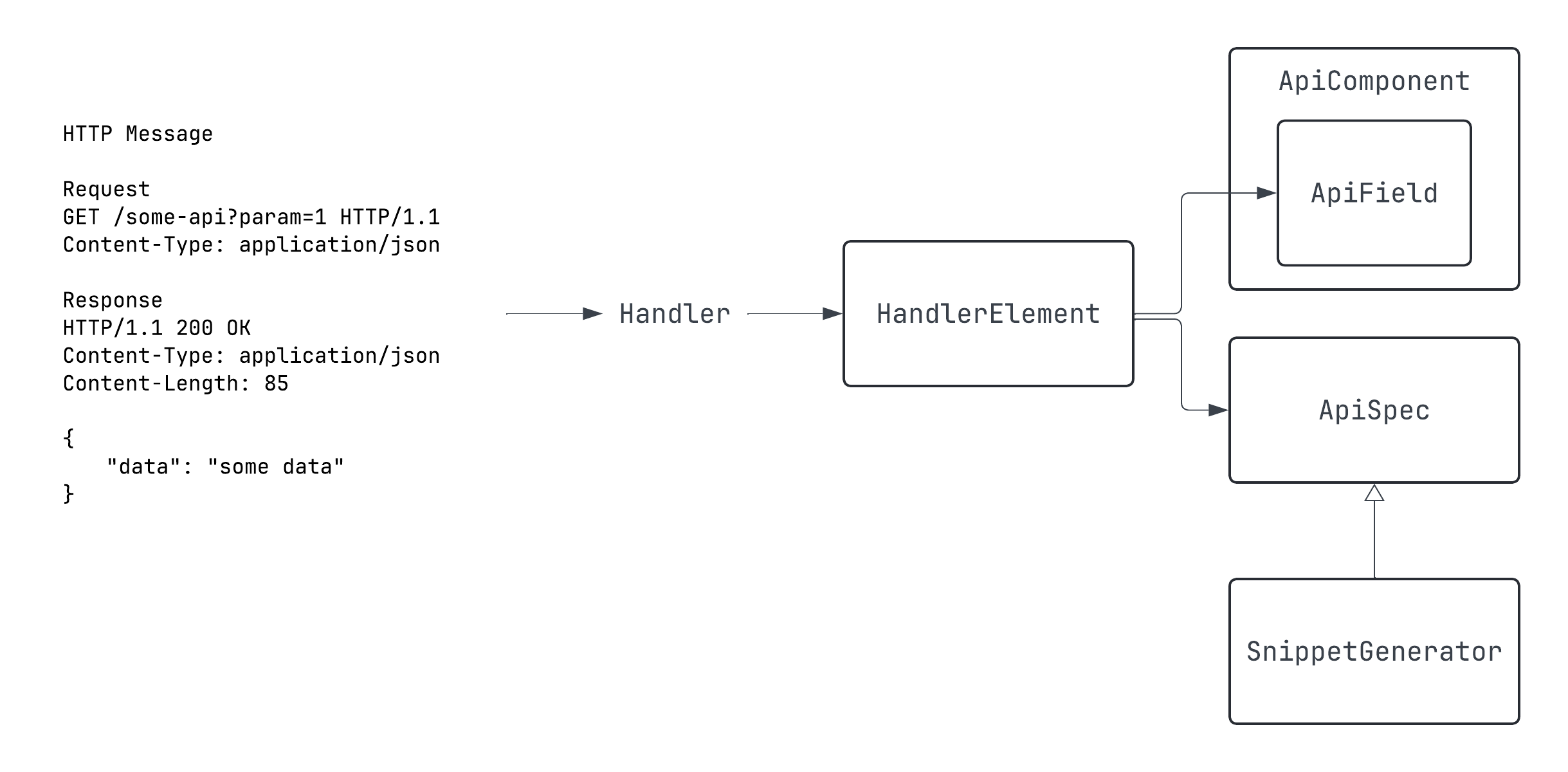
In Spring MVC, HTTP requests and responses are mapped via handlers.
The components that make up HTTP requests and responses (query parameters, path variables, body, etc.) are mapped to the handler's annotations, parameters, and return types.
Spring REST Docs helps document these components by providing a way to describe the fields that make up each component and integrate them into documentation.
In Spring REST Docs, fields within each component are represented by AbstractDescriptor,
which is then combined into a Snippet.
The combined Snippet is ultimately handled by the document function, which, together with the document's identifier,
processes the API call results to finally generate snippets in formats like Asciidoc.
This library offers DSL capabilities while aligning with Spring REST Docs' structure by providing four main interfaces:
ApiField, corresponding toAbstractDescriptorApiComponent, corresponding toSnippetApiSpec, which integrates allSnippets for a single APISnippetGenerator, which converts the written DSL intoSnippets.
Additionally, there's an interface called HandlerElement that doesn’t provide a DSL
but captures the necessary information from the handler’s elements and converts them into ApiField.
Let’s look at these four interfaces using a simple HTTP API example:
HTTP Message

Request
GET /some-api?id=abc&num=5 HTTP/1.1
Content-Type: application/json

Response
HTTP/1.1 200 OK
Content-Type: application/json
Content-Length: 85
{
    "data": "some data"
}
Given an API communicating with messages like the one above, the components and fields extracted are as follows:
| Component | Field |
|---|---|
| Query Parameter | id, num |
| Response Body | data |
ApiField is the DSL interface that allows you to document the fields listed in the table above.
The ApiComponent interface integrates these ApiField properties by component.
The ApiComponent generated is then handled by a suitable SnippetGenerator in the ApiSpec implementation,
allowing the DSL functions to be invoked.
Once an ApiComponent is created, the ApiSpec implementation will implement the appropriate SnippetGenerator for each component,
allowing you to call DSL functions.
Let’s examine the ApiComponent implementations and ApiField properties generated after mapping the API to a handler:
public object ExampleApiResponseBody : BodyComponent(false) {
  public val `data`: JsonField = JsonField("data", false, 0)

  init {
    addFields(
      `data`
    )
  }
}

public object ExampleApiQueryParameter : ApiComponent<ParameterDescriptor>() {
  public val id: QueryParameterField = QueryParameterField("id")

  public val num: QueryParameterField = QueryParameterField("num")

  init {
    addFields(
      `id`,
      `num`
    )
  }
}
Two ApiComponent implementations, ExampleApiResponseBody and ExampleApiQueryParameter, were generated.
Each holds the fields as ApiField-typed properties corresponding to their respective components.
These generated ApiComponents are then declared as type parameters for SnippetGenerator implementations,
which are invoked in the ApiSpec implementation to call the appropriate DSL functions.
Let's now look at the ApiSpec generated:
public data class ExampleApiSpec(
  override val identifier: String,
) : ApiSpec,
    ResponseBodySnippetGenerator<ExampleApiResponseBody>,
    QueryParameterSnippetGenerator<ExampleApiQueryParameter> {
  override val snippets: MutableList<Snippet> = mutableListOf()

  override fun getResponseBodyApiComponent(): ExampleApiResponseBody = ExampleApiResponseBody

  override fun getQueryParameterApiComponent(): ExampleApiQueryParameter = ExampleApiQueryParameter

  override fun addSnippet(generatedSnippet: Snippet) {
    this.snippets.add(generatedSnippet)
  }

  override fun addSnippets(generatedSnippets: List<Snippet>) {
    this.snippets.addAll(generatedSnippets)
  }
}
This HTTP API only includes query parameters and a response body, so the ApiSpec implementation,
ExampleApiSpec, implements the corresponding SnippetGenerator interfaces.
Each SnippetGenerator implementation has appropriately named functions.
For example, ResponseBodySnippetGenerator has the responseBody function,
and QueryParameterSnippetGenerator has the queryParameters function:
interface QueryParameterSnippetGenerator<C: ApiComponent<ParameterDescriptor>> : SnippetGenerator {

    fun queryParameters(dsl: C.() -> Unit) {
        ...
    }
    ...
}

interface ResponseBodySnippetGenerator<C: BodyComponent> : SnippetGenerator {

    fun responseBody(dsl: C.(element: C) -> Unit) {
        ...
    }
    ...
}
These functions take as parameters functions that have the type declared in the type parameter as the receiver.
Since the type parameter is of ApiComponent type and ApiComponent contains ApiField properties,
you can call Component DSL functions using those properties within the function block.
HTTP Component DSL
As mentioned earlier, the HTTP components constituting requests and responses can be documented
using DSL through the functions of SnippetGenerator implementations.
| HTTP Component | Implementation | Function Name |
|---|---|---|
| Request Path Variables | PathVariableSnippetGenerator | pathVariables |
| Request Parameters | QueryParameterSnippetGenerator | queryParameters |
| Request Headers | RequestHeaderSnippetGenerator | requestHeaders |
| Request Cookies | RequestCookieSnippetGenerator | requestCookies |
| Request Parts | RequestPartSnippetGenerator | requestParts |
| Request Body | RequestBodySnippetGenerator | requestBody |
| Response Headers | ResponseHeaderSnippetGenerator | responseHeaders |
| Response Cookies | RequestCookieSnippetGenerator | responseCookies |
| Response Body | ResponseBodySnippetGenerator | responseBody |
If an API includes request headers and both request and response bodies,
the ApiSpec implementation will implement RequestHeaderSnippetGenerator, RequestBodySnippetGenerator,
and ResponseBodySnippetGenerator. Consequently, you can call the DSL functions as follows:
document(SimpleUsageApiSpec("simple-usage")) {
    requestHeaders { ... }
    requestBody { ... }
    responseBody { ... }
}
Component DSL
As mentioned, the fields constituting an HTTP component are handled as ApiField properties,
corresponding to Spring REST Docs' AbstractDescriptor.
responseBody {
    result means "Whether the login was successful" typeOf STRING formattedAs "Success or Failure"
    status means "User's status" typeOf ENUM(UserStatus::class)
}
This example demonstrates how to document the result and status fields using the DSL.
The DSL uses infix notations, and all functions return ApiField itself, enabling chaining.
Available Infix Notations
| Function Name | Description | Parameter Type |
|---|---|---|
means | Provides a description for the element. Corresponds to AbstractDescriptor.description. | String |
typeOf | Specifies the type of the element. Corresponds to org.springframework.restdocs.payload.FieldDescriptor.type. If the type isn't FieldDescriptor, it is passed to the formattedAs function. | ApiFieldType |
formattedAs | Adds the given format string to the AbstractDescriptor.attributes with the format key. | String |
isIgnored | Ignores the element in the documentation. Corresponds to org.springframework.restdocs.snippet.IgnorableDescriptor.ignored. | Boolean |
isOptional | Marks the element as optional. Corresponds to optional() in each AbstractDescriptor implementation. | Boolean |
ApiFieldType
This class is a wrapper around JsonFieldType and is designed to simplify the documentation of commonly used formats.
open class ApiFieldType(
    val fieldType: JsonFieldType,
    open val customFormat: String? = null
)

data object ARRAY: ApiFieldType(JsonFieldType.ARRAY)
data object BOOLEAN: ApiFieldType(JsonFieldType.BOOLEAN)
data object OBJECT: ApiFieldType(JsonFieldType.OBJECT)
data object NUMBER: ApiFieldType(JsonFieldType.NUMBER)
data object NULL: ApiFieldType(JsonFieldType.NULL)
data object STRING: ApiFieldType(JsonFieldType.STRING)
data object ANY: ApiFieldType(JsonFieldType.VARIES)
data object DATE: ApiFieldType(JsonFieldType.STRING, "yyyy-MM-dd")
data object DATETIME: ApiFieldType(JsonFieldType.STRING, "yyyy-MM-ddTHH:mm:ss")
Each ApiFieldType implementation adds the value of the customFormat property as a format attribute
when implementing the typeOf function.
override infix fun typeOf(type: ApiFieldType): JsonField {
    descriptor.type(type.fieldType)
    if (type.customFormat != null) descriptor.format(type.customFormat!!)
    return this
}
This function is implemented in JsonField. For objects like DATE and DATETIME that have a customFormat,
the corresponding value is added to the format attribute.
data object UUID: ApiFieldType(JsonFieldType.STRING, "UUID format")
If there are custom formats frequently used in your project,
you can extend ApiFieldType and create your own, like the example above.
data class ENUM<T : Enum<T>>(
    val enums: Collection<T>,
    override val customFormat: String? = enums.joinToString(", "),
) : ApiFieldType(JsonFieldType.STRING) {

    constructor(
        clazz: KClass<T>,
        filter: (T.() -> Boolean)? = null
    ) : this(
        enums = clazz.java.enumConstants.asList().let {
            if (filter != null) it.filter(filter) else it
        },
    )

}
A convenience object is also provided for Enum types, making it easier to document them.
enumValue means "enum" typeOf ENUM(listOf(EnumExample.A, EnumExample.B))
enumValue means "enum" typeOf ENUM(EnumExample::class) { isA() || isB() }
Two constructors allow you to specify possible values. The first line provides a list of possible values directly, while the second line filters the possible values by calling functions defined in the Enum.
Nested JSON Fields
JSON fields can be simple values like strings or numbers, but they can also represent nested objects or arrays of objects.
Spring REST Docs allows you to document these nested fields using subsectionWithPath or beneathPath.
However, this library provides a more elegant way to document nested fields.
If a field is nested, it will be declared as a NestedJsonField or NestedArrayJsonField property.
NestedArrayJsonField extends NestedJsonField, and this class supports nested object DSL through the of function:
responseBody {
    result means "Whether the login was successful" typeOf STRING formattedAs "Success or Failure"
    status means "User's status" typeOf ENUM(ExampleController.SimpleResponse.UserStatus::class)
    detail means "User's detail information" typeOf OBJECT of {
        userId means "User's id" typeOf STRING
        password means "User's password" typeOf STRING isIgnored true
        profileMessage means "User's profile message" typeOf STRING isOptional true
    }
}
In the example above, the detail field is a nested object field.
You can document its fields using the of function, as shown.
infix fun of(nestedFieldDetailDsl: E.() -> Unit) {
    nestedElement.nestedFieldDetailDsl()
}
The of function takes a function as a parameter,
where the type parameter E is an ApiComponent implementation
that holds the nested object's fields as JsonField properties.
Let’s look at the generated ApiComponent implementation:
public object SimpleUsageApiResponseBody : BodyComponent(false) {

  ...

  public val detail: NestedJsonField<SimpleDetail_0> = NestedJsonField("detail", SimpleDetail_0,
      false, 0)

  ...

  public object SimpleDetail_0 : BodyComponent(false) {
    public val userId: JsonField = JsonField("userId", false, 0)

    public val password: JsonField = JsonField("password", false, 0)

    public val profileMessage: JsonField = JsonField("profileMessage", false, 0)

    ...

  }
}
The detail property is declared as a NestedJsonField, with SimpleDetail_0 passed as the type parameter.
SimpleDetail_0 is an implementation of BodyComponent, holding the nested fields as properties.
As with other JSON data, you can use DSL to document these fields.